CI/CD Pipeline
The CI/CD pipeline is defined in .github/workflows/deploy.yml and .github/workflows/seed-mind-data.yml.
Performance Optimizations (FAS-79)
The pipeline includes several optimizations for faster builds:
- Next.js build caching: Test job caches
.nextfor Docker build (saves ~2-3 min) - Skip duplicate build: Test job skips build on manual deploy (saves ~3 min)
- Reduced BuildKit cache: Changed from
mode=maxtomode=min(saves ~5-6 min) - Skip lint/type-check in Docker: Uses build args since test job already validated (saves ~45-50s)
- Improved Dockerfile layering: Better cache invalidation with npm cache mounts (saves ~30-60s)
- Separate MIND seeding workflow: Long-running data import moved to separate workflow (saves ~10+ min on deploys)
Total expected savings: 10-15 minutes on average builds
Triggers
| Event | Jobs Run |
|---|---|
Pull Request to main | detect-changes, test, terraform-plan |
Push to main | detect-changes, test (quality gates only, no deploy) |
| Manual (workflow_dispatch) | All jobs (from any branch, with deploy option) |
The GitHub OIDC role trusts all branches (refs/heads/*), enabling team members to run CI/CD from feature branches using workflow_dispatch.
Important: Push to main no longer triggers automatic deployment. Use manual workflow dispatch to deploy.
Pipeline Jobs
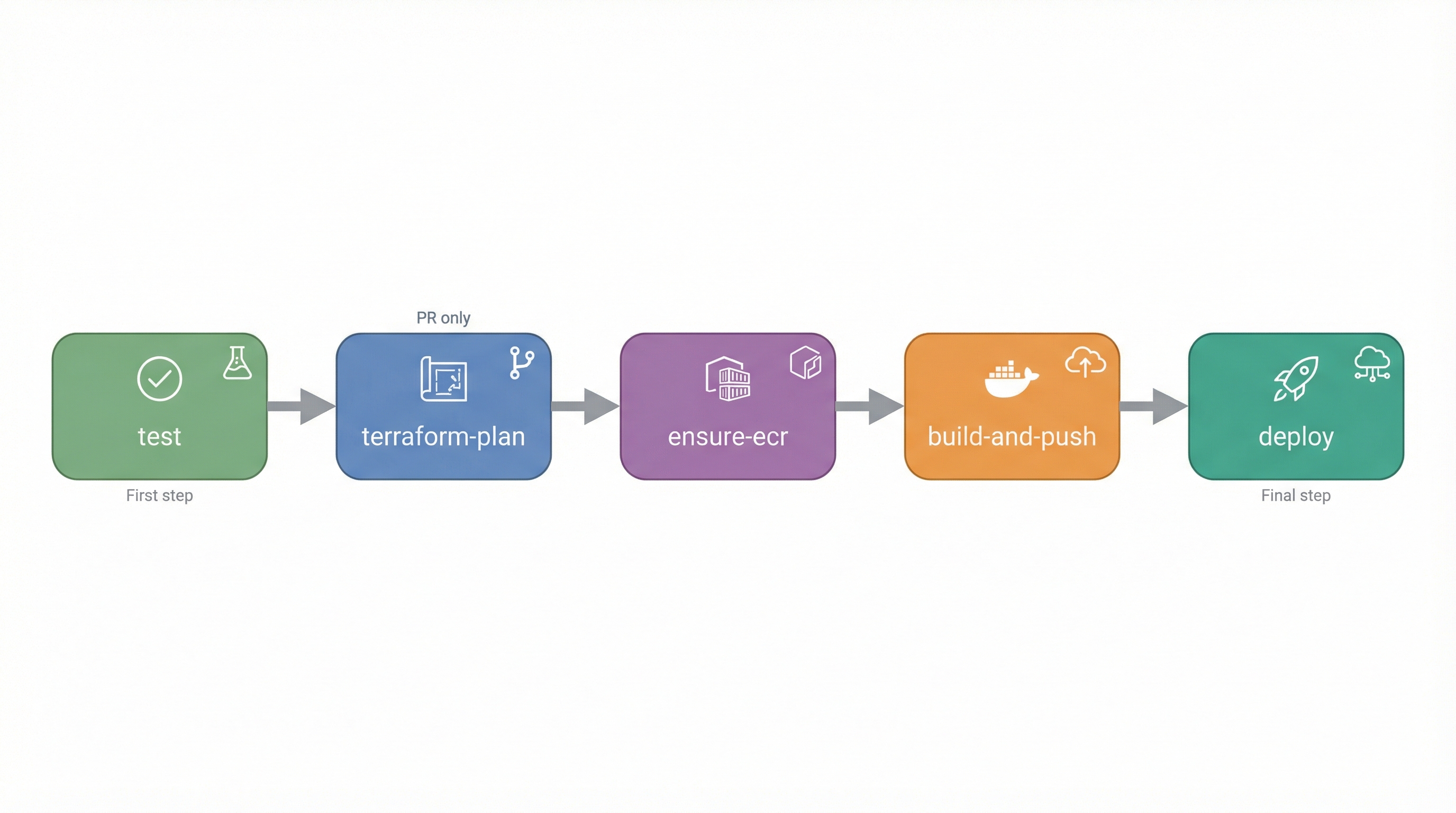
detect-changes
Determines what needs to run based on file changes.
- Detects app changes (src, prisma, Dockerfile, etc.)
- Detects infra changes (infra/, .github/workflows/)
- Decides whether to build and/or deploy
- Skips unnecessary steps for performance
test
Runs on every PR, push to main, and manual deploy.
steps:
  - npm ci
  - npm run lint
  - npm run type-check
  - npm run test
  - npm run build (skipped on manual deploy - Docker will build)
  - Cache .next for Docker build (PR/push only)
Optimization: On manual deploy, build is skipped to avoid duplication. Docker build reuses the cached .next from PR/push.
terraform-plan (PR only)
Shows infrastructure changes without applying them.
- Runs
terraform plan - Posts plan output as PR comment
- Helps review infrastructure changes
ensure-ecr (manual deploy only)
Ensures ECR repository exists before pushing images.
build-and-push (manual deploy only)
Builds and pushes Docker image to ECR.
- Platform:
linux/amd64 - Tag:
sha-{commit}-run-{run_number} - Uses BuildKit cache (
mode=minfor faster builds) - Restores Next.js build cache from test job
- Passes
SKIP_LINT=trueandSKIP_TYPE_CHECK=trueto Docker (already validated in test job)
deploy (manual deploy only)
Deploys to App Runner.
steps:
  - terraform init
  - terraform apply
  - Wait for deployment (up to 5 minutes)
  - Health check (up to 15 retries)
Required Secrets
| Secret | Purpose |
|---|---|
AWS_CI_ROLE_ARN | GitHub OIDC role for AWS |
DB_PASSWORD | RDS database password |
CLOUDFLARE_API_TOKEN | Cloudflare API access |
CLOUDFLARE_ZONE_ID | luminarium.ai zone ID |
CLOUDFLARE_ACCOUNT_ID | Cloudflare account |
Deployment Process
- Quality gates pass - lint, type-check, test
- ECR repository ready - Created if needed
- Docker image built - Multi-stage build with caching, pushed to ECR
- Terraform apply - Infrastructure updated (reuses existing image if infra-only change)
- Database migrations - Run against RDS with automatic failed migration resolution
- Wait for deployment - App Runner updates service
- Health check - Verifies
/api/healthreturns 200
MIND UAT Data Seeding
MIND test data seeding has been separated into its own workflow (.github/workflows/seed-mind-data.yml) for performance reasons. To seed test data:
- Go to Actions → "Seed MIND UAT Data"
- Click "Run workflow"
- Select environment (currently only
dev) - Choose whether to force re-seed (overwrites existing data)
- Click "Run workflow"
This workflow: - Connects to RDS database - Runs npm run db:seed:mind - Imports data from three commodity verticals (Cobalt, LBR SYP Lumber, South America Vegoils) - Takes ~10+ minutes to complete
Viewing Pipeline Status
GitHub Actions UI
- Go to repository → Actions tab
- Click on workflow run
- View job logs
PR Comments
Terraform plan output is posted as a PR comment:
## Terraform Plan ✅ Plan Succeeded

<details>
<summary>Click to expand</summary>

... plan output ...

</details>
Troubleshooting
Build Failures
Lint errors:
Type errors:
Build errors:
Deployment Failures
Terraform errors: - Check Terraform plan in PR comments - Verify secrets are set correctly - Check AWS permissions
Health check failures: - Check App Runner logs in AWS Console - Verify DATABASE_URL is correct - Check application logs
Manual Deployment
You can trigger a manual deployment from any branch:
- Go to Actions → "Luminarium Proof CI/CD"
- Click "Run workflow"
- Select your branch (e.g.,
mainor a feature branch) - Choose deployment options:
environment: Target environment - dev or test (default: dev)deploy: Deploy to target environment (default: true)force_build: Rebuild image even without app changes (default: false)- Click "Run workflow"
This is useful for: - Testing infrastructure changes from feature branches - Forcing a rebuild when needed - Deploying hotfixes
Infrastructure Changes
Only infrastructure owners should modify the CI/CD pipeline.